

Outpost Plugin Coming Soon
The most honest review of my publishing setup was my thumb. A thought worth keeping would arrive while I stood in a parking lot, and my thumb would open someone else’s app. That app was three taps away. My own WordPress site wasn’t.
Search for how to post to WordPress from phone. The answers come in four flavors:
- The Jetpack app. Signs you into a vendor account before it will talk to the site you already own.
- The WordPress app, without Jetpack. You log in with your site address and your wp-admin credentials, and the app trades them for an application password. No vendor account, which is the part most people miss. It still opens one general-purpose editor; two-factor logins are not supported on that path, and security plugins and hosts sometimes block it outright.
- wp-admin in a mobile browser. Hands your thumb an interface built for a desk.
- Waiting until you reach a laptop. Loses the post, because a parking lot thought rarely survives the drive home.
Option two is the honest answer nobody says out loud: you can already post to WordPress from a phone without handing anyone a login. It just drops you into the same editor built for essays, with a title field waiting at the top.
For years I read that friction as the cost of publishing the right way. Here’s the reframe that got me unstuck: convenience is an interface problem, not evidence against owning your posts. The open standards you need to post to WordPress from phone already exist. What was missing was a composer designed around the shapes personal sites actually publish. So I built one, and building it was a product decision, not a breakup with WordPress.
📱 A note, a reply, and a photo
The gap showed up in the same three places every time I tried to post to WordPress from my phone.
The quick thought came first. In any social app, typing a sentence and hitting post takes seconds, and the whole screen is built around making sure it does. My site asked more of me. Open a browser, log in, wait for an admin screen designed for desktop, then focus on the title field, because the block editor assumes a post has a title. A one-sentence thought doesn’t. The same editor that helps me shape a long essay was asking me to file paperwork for a passing comment.

Replies were worse. When I respond to someone on a platform, my reply appears below their post, and the two stay connected. When I respond from my own site, I’m writing a regular post with a pasted link. A human reader might follow the thread. The web itself can’t, because nothing in a stock WordPress post says this answers that.
Photos stung the most. My camera roll shares to any social app in 2 taps, with a caption included. Getting the same photo onto my own site meant a clumsy upload through the admin screen, an alt text field I had to hunt for, and location data from my camera still tucked inside the file unless I remembered to strip it.
None of this made me want to give up my site. It did mean my quickest, most human posts kept landing somewhere else, one sentence at a time.
🧩 Convenience is an interface problem
If you run a personal site, you may have made the same quiet deal I did: the apps get the quick posts, the site gets the essays. The deal feels like discipline. It’s actually design.
The big platforms spend real design money on their posting screens, because capture is the business model. Every second shaved off posting feeds the feed. Meanwhile, every official mobile path for a WordPress site you host yourself lands in the same place. Accept a vendor login, or accept a general-purpose editor, or squeeze a desktop admin onto a phone screen. None of those is malicious. All of them are defaults nobody chose with personal publishing in mind.
Naming that changed how I felt about it. My site didn’t lose the quick posts because ownership is impractical. It lost them because nothing on my phone respected a thumb, thirty seconds, and a sentence with no title. Maybe you’ve been treating the friction as the membership fee for the open web. Here’s your permission slip: it’s a tooling gap, and tooling gaps close.
🔌 The connection already exists: Micropub and IndieAuth
Then came the part that embarrassed me a little. The plumbing to post to WordPress from a phone had existed for years, published as open standards.
Micropub is a W3C Recommendation, a standard API that lets a client app create posts on any site that speaks it. IndieAuth answers the sign-in question with your own domain instead of a vendor account. WordPress supports both through plugins the IndieWeb community has maintained for years. David Shanske’s Micropub plugin provides the endpoint, and the IndieAuth plugin by Matthias Pfefferle and David Shanske handles the sign-in.
So the pipes were never the problem. Any app that speaks Micropub can post to my site as me, with no platform in the middle. The missing piece was a mobile interaction designed around what personal publishing actually looks like: notes, replies, photos, and the small life updates social apps taught us to share.
📮 Outpost: a real way to post to WordPress from phone
The fix wasn’t a new protocol, and it definitely wasn’t a new CMS. It was a front end. I built Outpost, a WordPress plugin that serves a progressive web app composer from your own domain at /post. You install it to your home screen like any app. It signs you in via IndieAuth and communicates with your site via Micropub. The composer opens on tabs grouped by post shape instead of one generic editor: notes, replies, photos, media logs like listen and watch, life entries, even recipes.
With my Post Kinds for IndieWeb companion active, each entry publishes classified as its proper kind on your site. Without it, those entries still publish, but as plain notes.
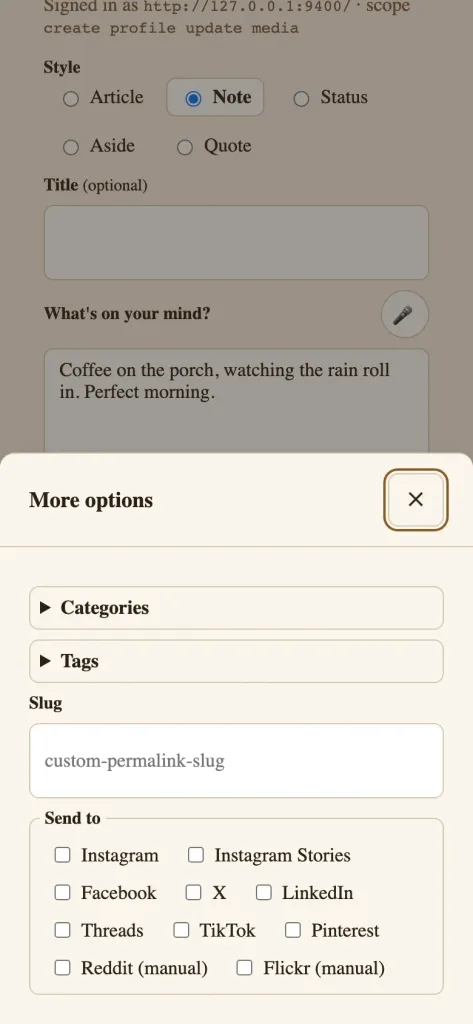
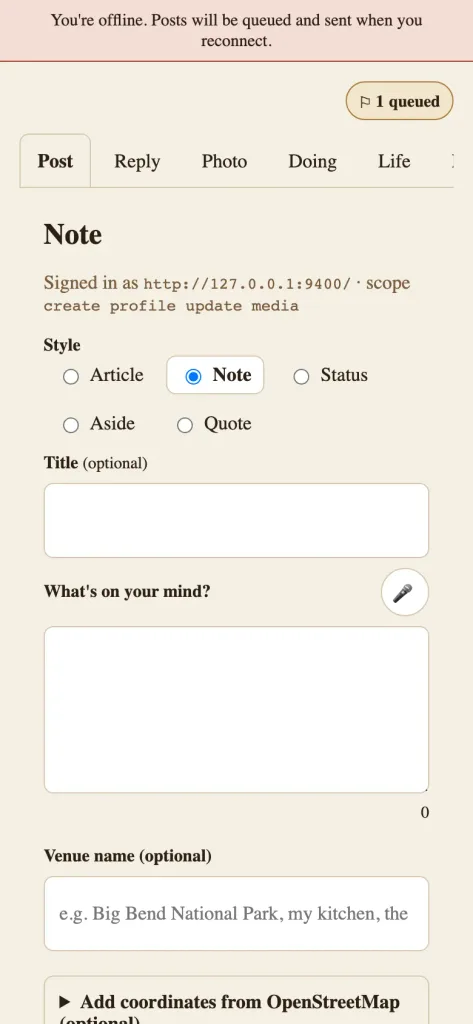
Now replay those three moments. A note is icon, type, post. There’s still a title field, and it’s optional, which is the whole difference. Syndication sits one tap away under More options, a checkbox per destination your site advertises. The IndieWeb calls this POSSE: publish on your own site, syndicate elsewhere. Your site keeps the original, and copies go where your people are.
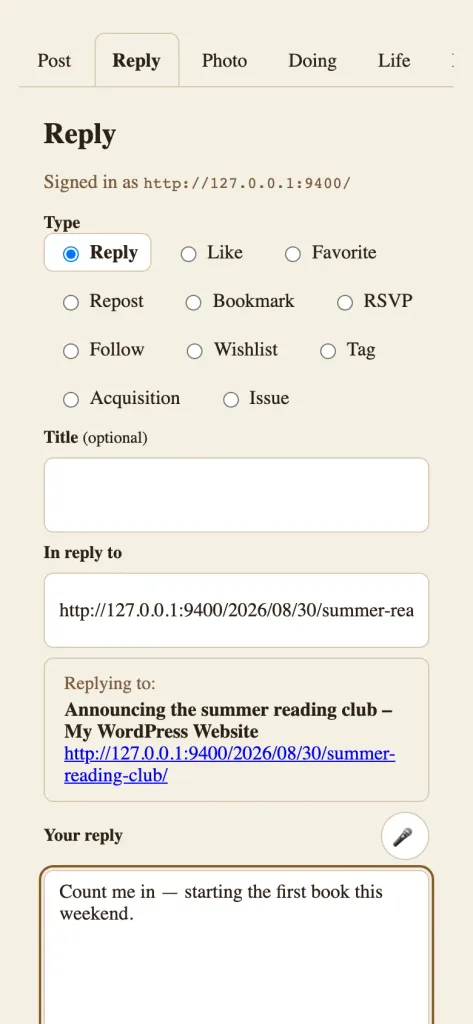
A reply starts with a pasted URL. The composer fetches a preview of the page you’re answering, so you can see it while you write. And the published post carries the piece a stock editor drops: the link that tells the web, “This answers that.” Likes, reposts, and bookmarks are one more tap on the same screen. With the right companion active, even relationship metadata can ride along, an idea I explored in my XFN post.
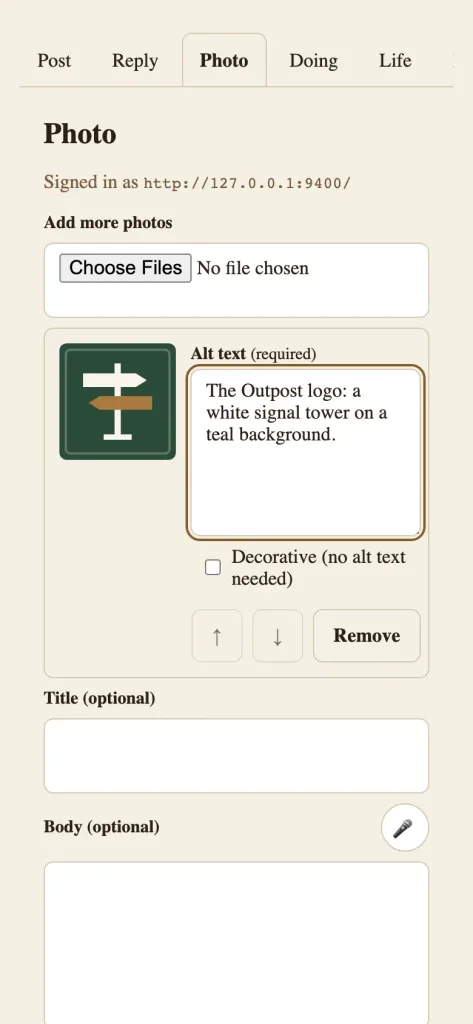
A photo is brought in via the share sheet or the picker. Alt text is required by design, and a decorative image takes a deliberate toggle rather than a silent skip. The upload strips camera metadata, so a backyard photo doesn’t publish your GPS coordinates. If the signal dies, an offline queue holds the draft and sends it when the connection returns.
Outpost also draws none of its own paint. The plugin owns the layout, the touch targets, and the focus states. Your theme owns every color and font, so the composer on my site looks like my site. Companions such as Post Formats for Block Themes add a format selector with auto detection.
None of this replaces WordPress. Outpost is a WordPress client, just as a mail app is a client for your mail server. The canonical post lives in your database, your theme renders it, and your feeds carry it. It stands on work the IndieWeb WordPress community shipped first: the Micropub and IndieAuth plugins and the IndieWeb Press This pattern. My part was the product decision that quick posts deserve the same design attention the big platforms give them. These days, when I post to WordPress from phone, the whole interaction is the icon, the thought, and the post button.
🚧 Where the evidence stops
Outpost runs in production on courtneyr.dev. That proves one site on one host, not compatibility with every host, and managed hosts in particular like to get creative with authentication. It requires the Micropub plugin, uses the IndieAuth plugin as its auth provider, and some workflows want extra configuration or external keys.
Version honesty matters too. The code calls itself 1.0.0, passed a Plugin Check readiness audit, and went to the WordPress.org plugin directory in July. It’s in review now, and the review team and I are trading rounds of feedback and updated builds. Until it’s approved and listed, installing means installing from GitHub after reading the requirements. The newest formal GitHub release is still v0.2.0. When the listing lands, the repository will say so before I do.
🗺️ Read the workflow before you install anything
The smallest honest next step isn’t an install. It’s ten minutes with the Outpost repository, where the README walks through the workflow, the required plugins, and the current status in plain language. Maybe the shapes match how you publish. Maybe they match how you’d publish if you could post to WordPress from your phone in three taps. Either way, the documentation site covers installation and a getting-started path.
And if you write a response to this from your own site, that isn’t a hypothetical. That’s the loop, working.